TEXT2NER
Functional description and user manual for an application for processing historical studies and documents: Named Entity Recognition (NER) and Named Entity Linking (NEL) with reference databases (knowledge bases).
TEXT2NER is an application designed to support the preliminary editorial processing of historical source transcriptions. It takes plain text input, divides it into a paragraph structure, creates a working TEI-XML document in which named entities are recognized, and can then perform identification against external reference databases. The tool has been designed primarily for fourteenth- to sixteenth-century texts in Latin, Polish, and German, especially those connected with the Kingdom of Poland, which is reflected in the contents of the auxiliary dictionaries. Nevertheless, the application is general enough to process other texts as well; the examples later in this description include, for instance, a fragment of an entry from the Polish Wikipedia.
In its current version, the application recognizes five tag types: persName, placeName, date, roleName, and orgName. Not all of them need to be used in every analysis run. The user can decide which tag types should be enabled before recognition starts. This is done in the application parameters window opened with the Parameters button at the top of the screen. In addition, a separate Dictionaries window allows selected auxiliary dictionaries used in entity search and interpretation to be edited without modifying the application code.
The application uses large language models (LLMs) from the Gemini family. The model's task is to search for named entities (NER), then analyze their form (the model prepares the basic form, the nominative case of the name), analyze the context of the name's occurrence. For example, in the case of persons, additional information is sought that can facilitate the identification of the person - occupation, office. For places - additional identifying data (e.g., information that the town is located near another larger town, etc.). Based on the basic form of the name, additional forms (prepared by the application using definable dictionaries, e.g., Polish versions of Latin names and office names: Iohannis episcopus Missenensis will also be searched for as John the Bishop of Meissen), and context analysis, the model prepares a query plan for reference databases, which are then executed by the script. Results - The list of candidates for identifying a named entity is first filtered, e.g., persons by chronology - a person living in the 18th century cannot be a person mentioned in a 16th-century document. The filtered list of candidates is then evaluated by the model, which has access not only to names but also to data from the document context and knowledge base data regarding the candidate for identification.
What the application does
The application performs two related but separate tasks.
- It recognizes entities in the text, according to the selected settings, and writes them as TEI-XML.
-
For
persNameandplaceNametags, it can additionally attempt reference identification by assigningkeyandrefattributes.
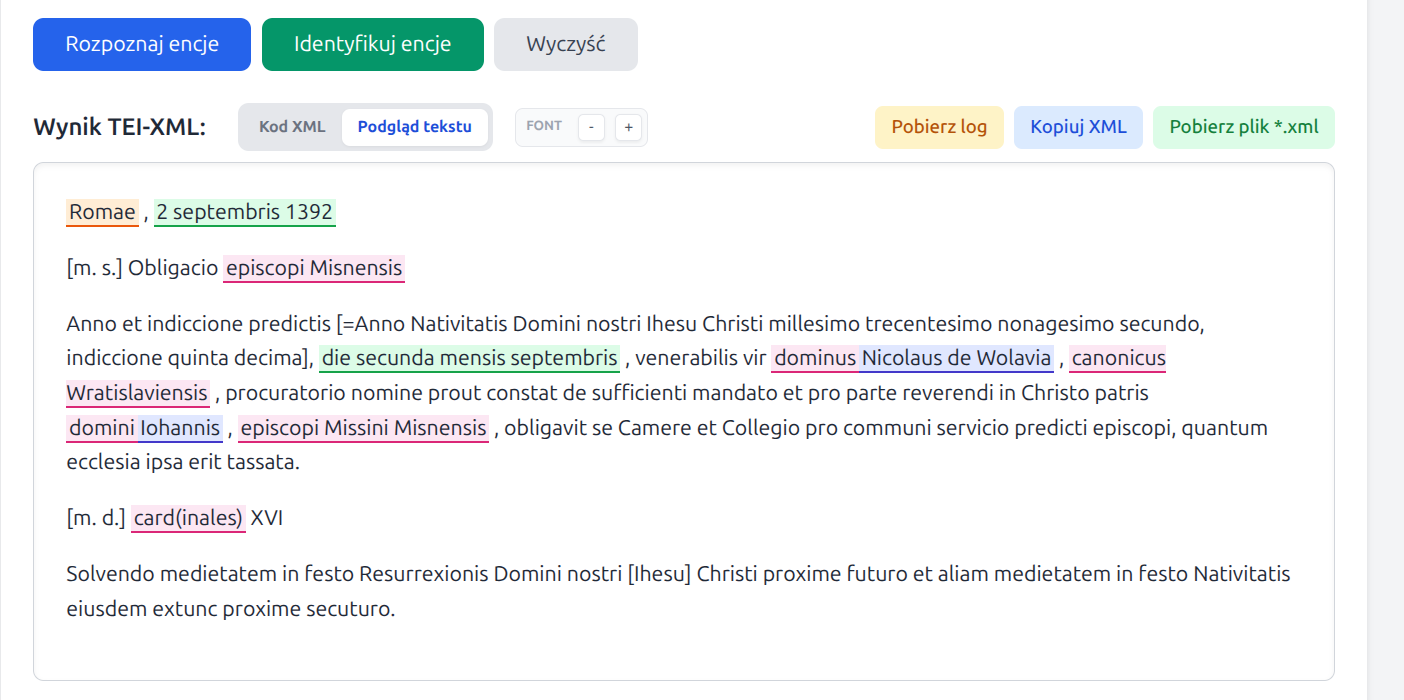
In the web interface, these two stages are now separated. First, the user runs Recognize entities, which creates TEI-XML with tags; only afterwards can they optionally run Identify entities, which attempts to link persons and places to reference records.
Entity recognition currently includes:
persName- persons and historical figures, including Latin and early German forms,placeName- settlements, regions, countries, and other territorial units,date- dates, with an attempt to write thewhenattribute in ISO format,roleName- offices, functions, ranks, and social or ecclesiastical roles,orgName- institutions, organizations, and communities, especially ecclesiastical or political ones.
Reference identification is performed only for persName and
placeName. The date, roleName, and
orgName tags are recognized and written into the XML, but they are not linked
to external reference resources.
Operating model
TEXT2NER uses large language models. Gemini is responsible for recognizing entities in the text, performing an auxiliary analysis of name forms, and making the final choice of the best candidate during identification.
Identification workflow:
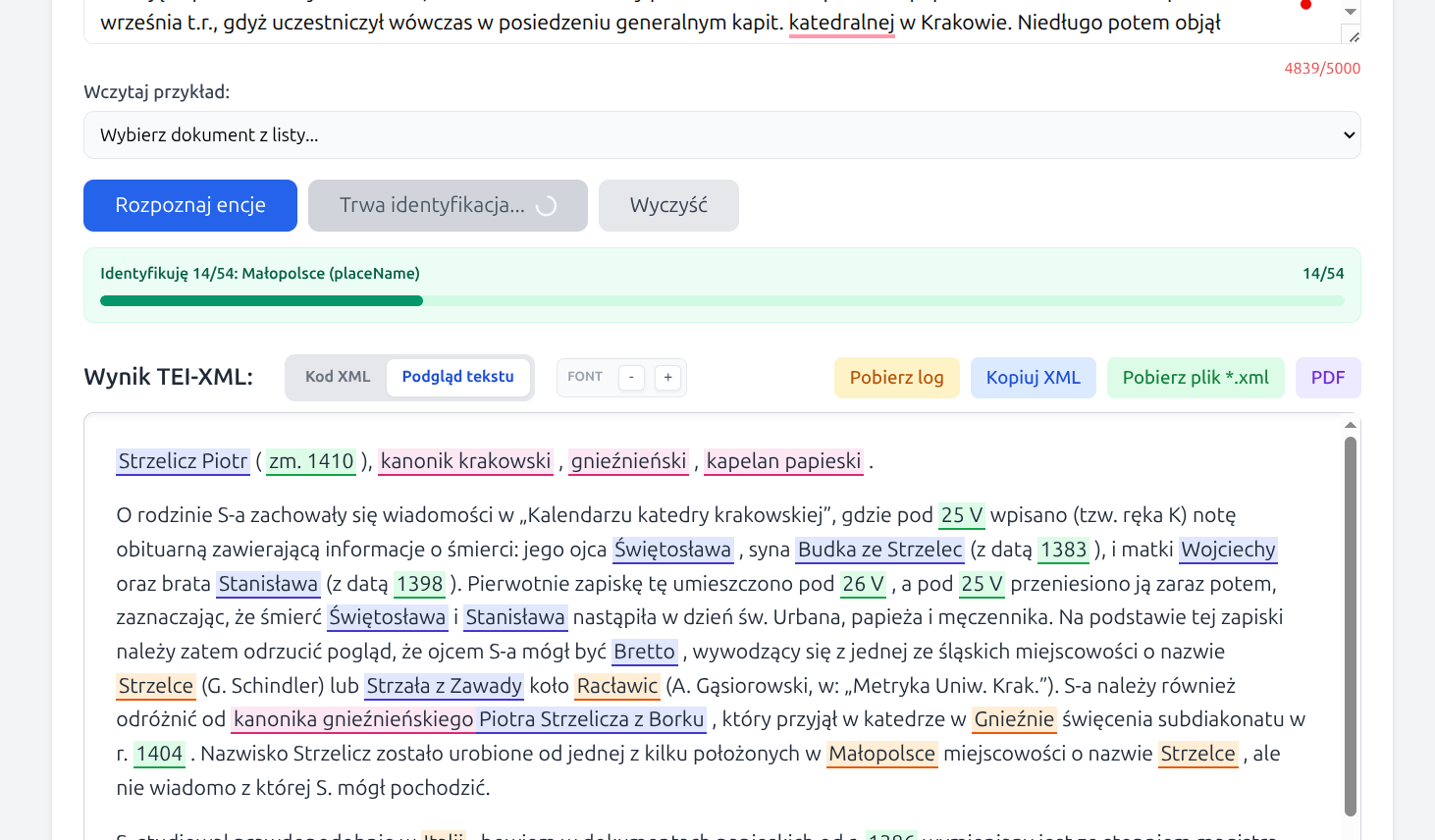
For the identification stage, the application relies on several reference sources. At present these are mainly: WikiHum, va.wiki.kul.pl, and Wikidata. For more difficult person-related cases, an additional fallback based on the Polish Wikipedia is also available.
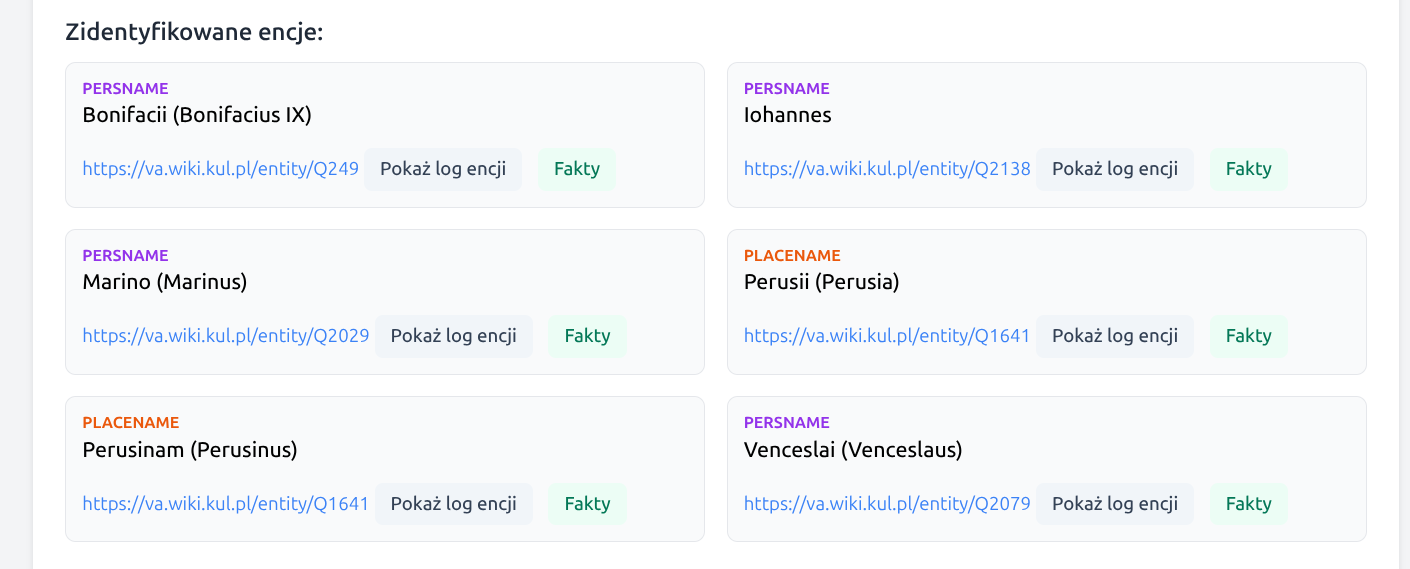
In unresolved cases, the application may display a list of the most probable candidates for manual selection by the user. This list is pre-filtered: for persons, candidates with a clear chronological conflict against the document dates are omitted, and the number of suggestions is limited so that the user is not handed the entire noise of the search results. Entities with manual identification are marked with an explanatory label, and the manual choice can also be withdrawn.
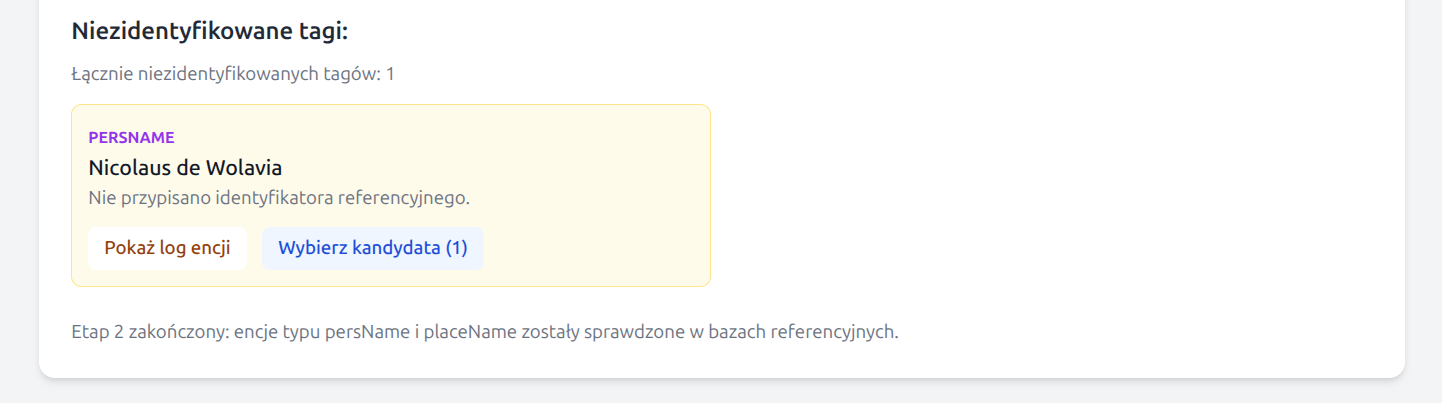

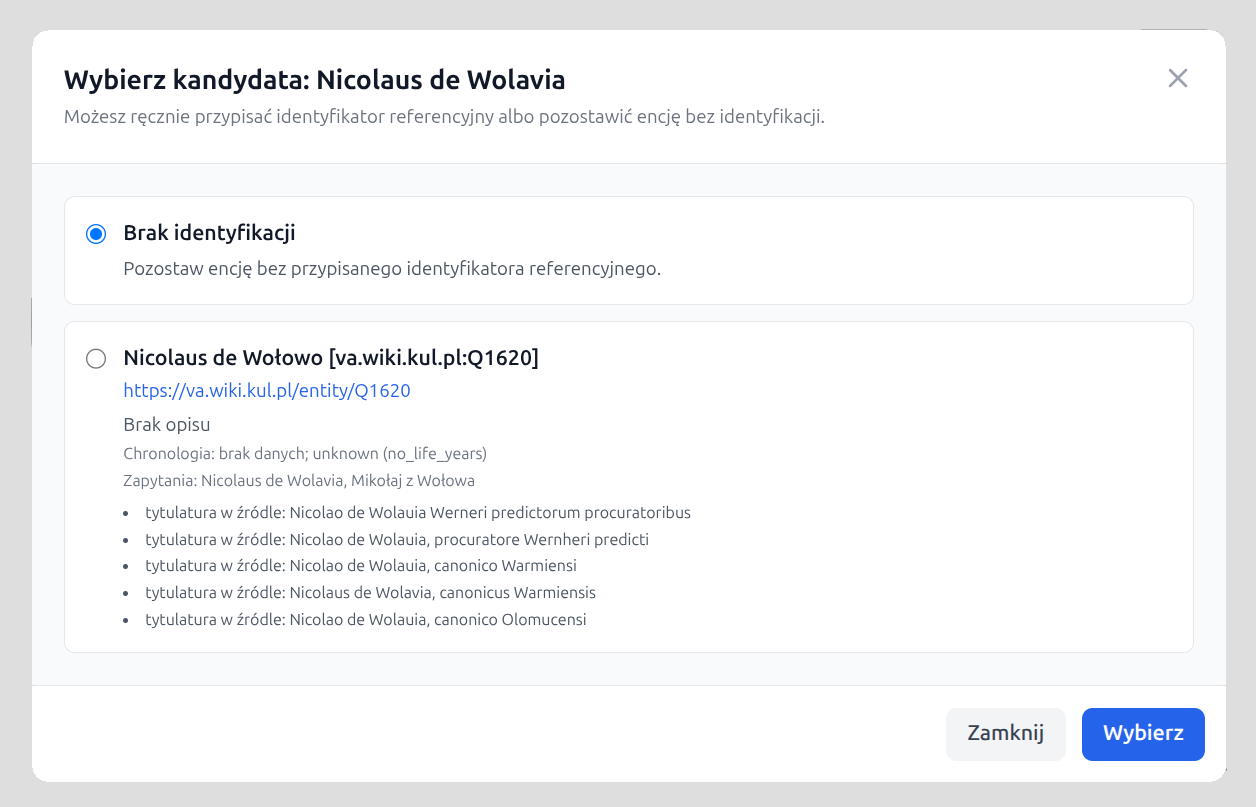
If a match to a reference record is not sufficiently reliable, the entity remains without a
ref attribute, but it may still keep a cautiously established normalized form
in key.
Wikidata requests are handled cautiously: the application rate-limits requests to
wikidata.org and respects HTTP 429 responses by reading the
Retry-After header and retrying after the indicated delay. This reduces the
risk of being blocked by external reference services.
Analysis parameters
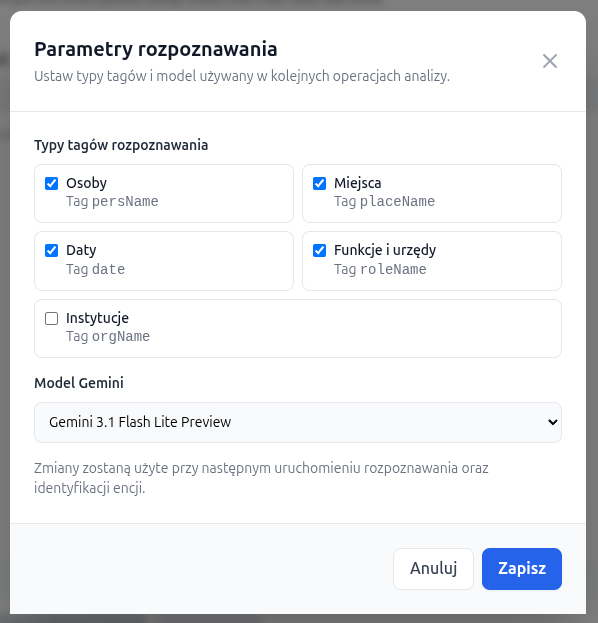
The Parameters button is available in the upper-right part of the interface. It opens a window where the user can define:
- which tag types should be recognized in a given run,
- which Gemini model should be used for the analysis.
Four tag types are enabled by default:
persName, placeName, date, and
roleName. The orgName tag can be enabled additionally if the user
also wants to recognize institutions.
The default model is
Gemini 3.1 Flash Lite Preview
(gemini-3.1-flash-lite-preview), but the user can also choose
Gemini 3 Flash Preview
(gemini-3-flash-preview).
Auxiliary dictionaries
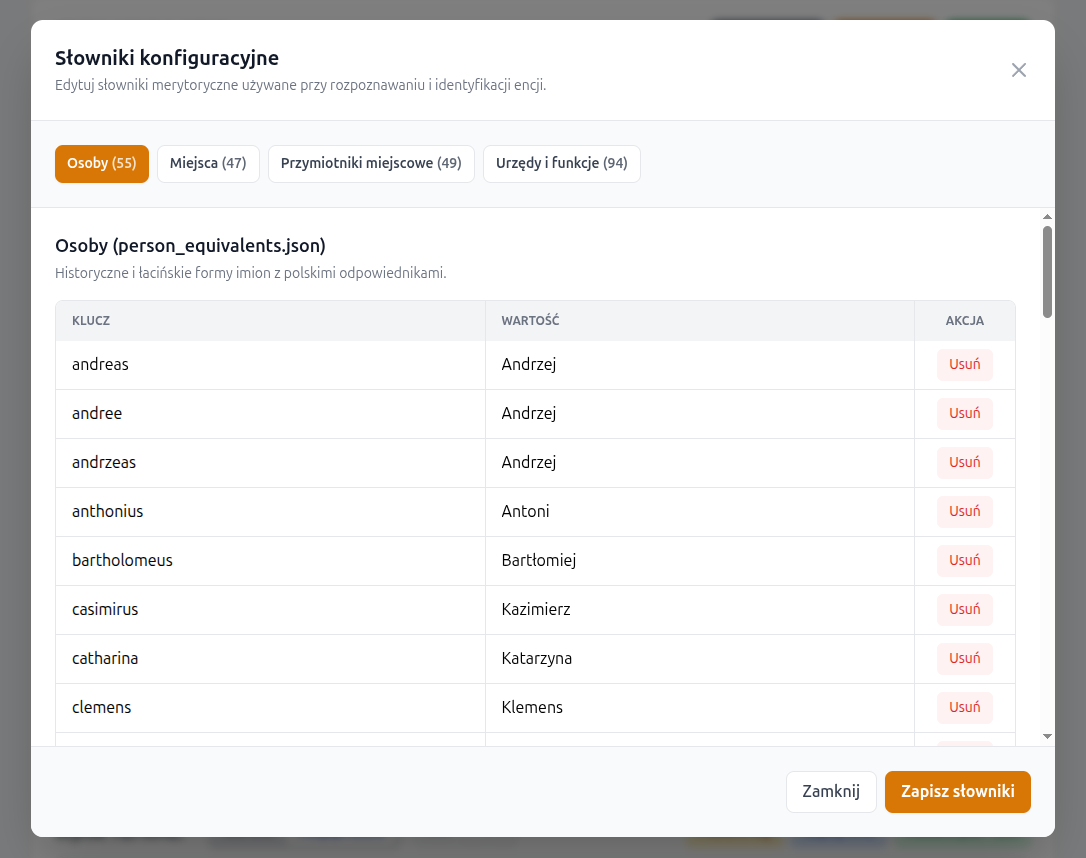
Next to the Parameters button, the interface also provides a Dictionaries button. It opens a separate window with four tabs, corresponding to the four auxiliary dictionaries currently used by the application.
- a dictionary of historical and Latin personal-name forms,
- a dictionary of historical and Latin place-name forms,
- a dictionary of adjectival Polish equivalents derived from place names,
- a dictionary of offices, functions, and ranks used in auxiliary query expansion.
Each dictionary can be edited as a simple set of key -> value pairs: new
rows
may be added, existing ones removed, and the updated version can be saved without
restarting the application.
During saving, the application validates that each row contains a non-empty key and value,
rejects duplicate keys, creates a .bak backup copy, and immediately reloads
the dictionaries in process memory.
Processing workflow
1. Entering the text
The user pastes text into the main input field. The current limit is 5000 characters. One of the sample documents available in the interface may also be used.
2. Entity recognition
After clicking Recognize entities, the application creates a new diagnostic log, automatically removes log files older than 48 hours, and then builds a working TEI-XML document in which only those entity types previously selected in the parameters window are tagged.
Tagging is performed in two Gemini passes: a first pass for recognizing entities in the text, and a second corrective pass that attempts to fill omissions and reduce obvious mistakes. The result of this stage does not yet contain reference identification, but it is already a complete TEI-XML document suitable for review, correction, and export.
3. Manual correction in text preview
After recognition, the user may switch to the Text preview tab. In this view, tags are color-highlighted and the text can be read in a form close to normal reading.
Manual editing of entities is also available:
- removing an existing tag,
- changing one tag type into another,
- adding a new tag after selecting an untagged fragment of text.
Editing is performed through a context menu. Tags cannot overlap. If the user manually changes tags after identification, the identification attributes are cleared and identification can be run again on the corrected XML version.
4. Entity identification
After clicking Identify entities, the application analyses only
persName and placeName tags, retrieves candidates from
reference databases, evaluates their fit to the context, and chooses the most probable
match.
At the beginning of this stage, a separate diagnostic log is created. The application also reads the full document text in order to extract dates that may help assess the chronology of person candidates.
If identification succeeds, the tag receives key and ref
attributes. If it does not, the entity remains in the XML without a full reference
link.
For unresolved entities, the application may prepare a short list of candidates for
manual selection. The selection window always also includes a
No identification option. If the user selects a candidate manually,
the application marks that choice in the interface as a manual choice
and writes the cert="medium" and resp="#manual" attributes
into the XML. The manual choice can be undone, returning the entity to the list of
unidentified items.
5. Final result
The application displays two result views:
- XML code - the TEI-XML structure, ready for further work and export,
- Text preview - a readable view with color-highlighted tags and auxiliary tooltips.
Below the main result, the interface also shows a list of identified entities and a list of tags that could not be reliably linked to an external reference record.
From the interface, the user may also download the full diagnostic log for the current run and display a log excerpt related to a specific entity. This makes it easier to understand why a particular candidate was selected or rejected.
Identified entities also include a Facts button. It opens a window
with two panels: on the left, data extracted from the document for the selected entity,
such as tagged text, context_clues, and context_years; on
the right, data for the selected reference entity, including its label, description,
and the most important facts from its properties (key_facts).
6. Saving Results
The application's output can be saved in TEI-XML format by copying it to the clipboard (Copy XML button) or downloading the file (Download *.xml file). You can also download a readably formatted PDF file (PDF button).
Diagnostic log
As some of the application’s decisions are based on a linguistic model and external data, the diagnostic log is a key component of the tool. It records the successive steps of recognition and identification, including entity form analysis, a list of candidates, chronological evaluation for persons, and a brief justification for the selection returned by the Gemini model.
The log is created automatically for each recognition and identification run. The application removes log files older than 48 hours so that the server disk is not cluttered. The full log can be downloaded with the Download log button, while entity boxes include a Show entity log button that displays only the fragment related to the selected tag. The log fragment can be copied to the clipboard directly from the modal window.
In addition to the raw log, the application presents selected information from the identification process in a more compact form in the Facts window. This is a faster way to check which clues were extracted from the document and which reference record data supported the match.
What does the diagnostic log contain, for example for a person (persName)? Below are excerpts from the log for the text “Nicolaum Lanczkoroński” from the edition of Acta Alexandrii, document no. 10 (pp. 9–10, “Sultan Bajazet II concludes a truce with Jan Olbracht…”). The first excerpt contains a preliminary analysis of the entity:
        [TEXT2NER-DIAG] Analiza encji 'Nicolaum Lanczkoroński' (persName):
        normalized_best='Nicolaus Lanczkoroński',
        confidence=high,
        lemma_candidates=['Nicolaus Lanczkoroński', 'Mikołaj Lanckoroński'],
        surface_variants=['Nicolaum Lanczkoroński', 'Nicolaus Lanczkoroński'],
        office_terms=[],
        place_terms=[],
        context_clues=['uczestniczył w uzyskaniu rozejmu (treugae pacis)',
                        'prowadził negocjacje z imperatorem Turków'],
        context_years=[1501]
system:
- sends a prompt to Gemini requesting a simple analysis of the entity’s form,
- parses the JSON returned by the model,
- normalises and completes the result on the Python side.
- normalized_best = the normalised base form of the search term
- confidence = e.g. high – how confident the model is in its analysis of the name form
- lemma_candidates = other base variants of the name used later to construct queries; some may come from the model, whilst others may be supplemented by code from dictionaries
- surface_variants = spelling or inflectional forms of the name that the application additionally considers useful for searching
- office_terms = offices and functions directly associated with the person
- place_terms = location clues such as ‘from Kraków’, ‘Bishop of Kraków’, ‘lived in Prussia’
- context_clues = additional contextual facts about the person, derived from the analysed document
The results in these fields are processed by a script (removing duplicates, sorting lists; for the fields
lemma_candidates
and surface_variants known Polish equivalents from dictionaries may be added; for
the tags placeName there is an additional validation step
to verify that we are indeed dealing with a place/locality; the field context_years
is populated by the script
based on any dates appearing in the document) The next step in the logged process is to search the so-called specialist Wikibase instances, which are historical reference databases: WikiHum and va.wiki.kul.pl.
        [TEXT2NER-DIAG] Plan zapytań dla 'Nicolaum Lanczkoroński' (persName):
                        ['Nicolaum Lanczkoroński', 'Nicolaus Lanczkoroński', 'Mikołaj Lanckoroński']
        [TEXT2NER-DIAG] Special:Search 'Nicolaum Lanczkoroński' -> WikiHum: []
        [TEXT2NER-DIAG] Filtrowanie WikiHum dla persName: []
        [TEXT2NER-DIAG] Special:Search 'Nicolaus Lanczkoroński' -> WikiHum: []
        [TEXT2NER-DIAG] Filtrowanie WikiHum dla persName: []
        [TEXT2NER-DIAG] Special:Search 'Mikołaj Lanckoroński' -> WikiHum:
                        ['Q159734', 'Q159736', 'Q159735']
        [TEXT2NER-DIAG] Filtrowanie WikiHum dla persName:
                        ['WikiHum:Q159734', 'WikiHum:Q159736', 'WikiHum:Q159735']
        [TEXT2NER-DIAG] Special:Search 'Nicolaum Lanczkoroński' -> va.wiki.kul.pl: []
        [TEXT2NER-DIAG] Filtrowanie va.wiki.kul.pl dla persName: []
        [TEXT2NER-DIAG] Special:Search 'Nicolaus Lanczkoroński' -> va.wiki.kul.pl: []
        [TEXT2NER-DIAG] Filtrowanie va.wiki.kul.pl dla persName: []
        [TEXT2NER-DIAG] Special:Search 'Mikołaj Lanckoroński' -> va.wiki.kul.pl: []
        [TEXT2NER-DIAG] Filtrowanie va.wiki.kul.pl dla persName: []
        [TEXT2NER-DIAG] Kandydaci ze źródeł specjalistycznych dla 'Nicolaum Lanczkoroński' (persName):
                        ['WikiHum:Q159736', 'WikiHum:Q159735', 'WikiHum:Q159734']
The query plan contains name variants from the fields
normalized_best, lemma_candidates, and surface_variants.
The search first covers
the WikiHum database, then va.wiki.kul.pl, both using fuzzy
search. The application saves the retrieved candidates in the form of QID identifiers for
further analysis. In this case, the va.wiki.kul.pl database returned no
candidates, whilst the WikiHum database returned 3 candidates.
Further analysis for individuals (tag persName) involves chronological analysis of the candidates found in the previous step. The current document has a single date (1501 – previously retrieved by the script), which serves as a reference for this analysis. A log excerpt looks as follows:
        [TEXT2NER-DIAG] Chronologia kandydatów dla 'Nicolaum Lanczkoroński'
                        (persName, źródła specjalistyczne), context_years=[1501]:
                1. Mikołaj Lanckoroński [WikiHum:Q159736]
                life: zm. 1597
                temporal: compatible
                reason: lata kontekstu mieszczą się w możliwym okresie życia;
                oszacowano narodziny <= 1497 z daty śmierci i limitu 100 lat
                queries: ['Mikołaj Lanckoroński']
                2. Mikołaj Lanckoroński [WikiHum:Q159735]
                life: zm. 1520
                temporal: compatible
                reason: lata kontekstu mieszczą się w możliwym okresie życia;
                oszacowano narodziny <= 1420 z daty śmierci i limitu 100 lat
                queries: ['Mikołaj Lanckoroński']
                3. Mikołaj Lanckoroński [WikiHum:Q159734]
                life: zm. 1462
                temporal: conflict
                reason: kontekst po śmierci kandydata (1462)
                queries: ['Mikołaj Lanckoroński']
For each candidate, the application retrieves additional data from a reference database (in this case, WikiHum), such as date of birth, date of death, description, etc. The date of birth and/or date of death, if available, allow for simple selection based on chronology. For each candidate, the application fills in the following fields:
- life: information about the years of the person’s life
- temporal: whether the chronological framework of the person’s life matches the chronology of the document (compatible or conflict)
- reason: an explanation regarding the content of the temporal field, why a given candidate matches the document or not
- queries: from which query the candidate originates
Candidates who have passed the chronological selection are analysed in a further stage by the Gemini model, which makes a decision as to whether any of them match the document sufficiently to be identified as a well-identified historical figure. Excerpt from the log showing the model’s results:
        [TEXT2NER-DIAG] Wybrany kandydat dla 'Nicolaum Lanczkoroński' (persName):
                        Mikołaj Lanckoroński [WikiHum:Q159735]
                        life=zm. 1520
                        temporal=compatible
                        reason=lata kontekstu mieszczą się w możliwym okresie życia;
                            oszacowano narodziny <= 1420 z daty śmierci i limitu 100 lat
                        queries=['Mikołaj Lanckoroński']
        [TEXT2NER-DIAG] Uzasadnienie Gemini dla 'Nicolaum Lanczkoroński' (persName):
                        reason=Mikołaj Lanckoroński (zm. 1520) jest kandydatem najbardziej dopasowanym
                        chronologicznie do daty 1501. Kandydat Q159734 zmarł przed wydarzeniem,
                        a Q159736 (zm. 1597) byłby w 1501 roku zbyt młody, by pełnić funkcje
                        dyplomatyczne przy imperatorze Turków.;
                        matched_signals=['zgodność chronologiczna z rokiem 1501',
                                        'aktywność życiowa w XVI wieku',
                                        'wykluczenie kandydatów zmarłych przed 1501']
The log first contains the model selection result along with the fields that characterised the candidate in question, and in the next entry, a detailed justification for this choice. The
matched_signals field
contains a short list of ‘decision signals’ returned by the model.
This can be regarded as the “most important arguments” that Gemini considered decisive.
The log may also include entries related to Wikidata request throttling. If Wikidata
returns an HTTP 429 response, the application records information about the
pause and retry. This matters especially for longer documents, where a single analysis may
generate many query variants for successive persons and places.
Diagram of the process
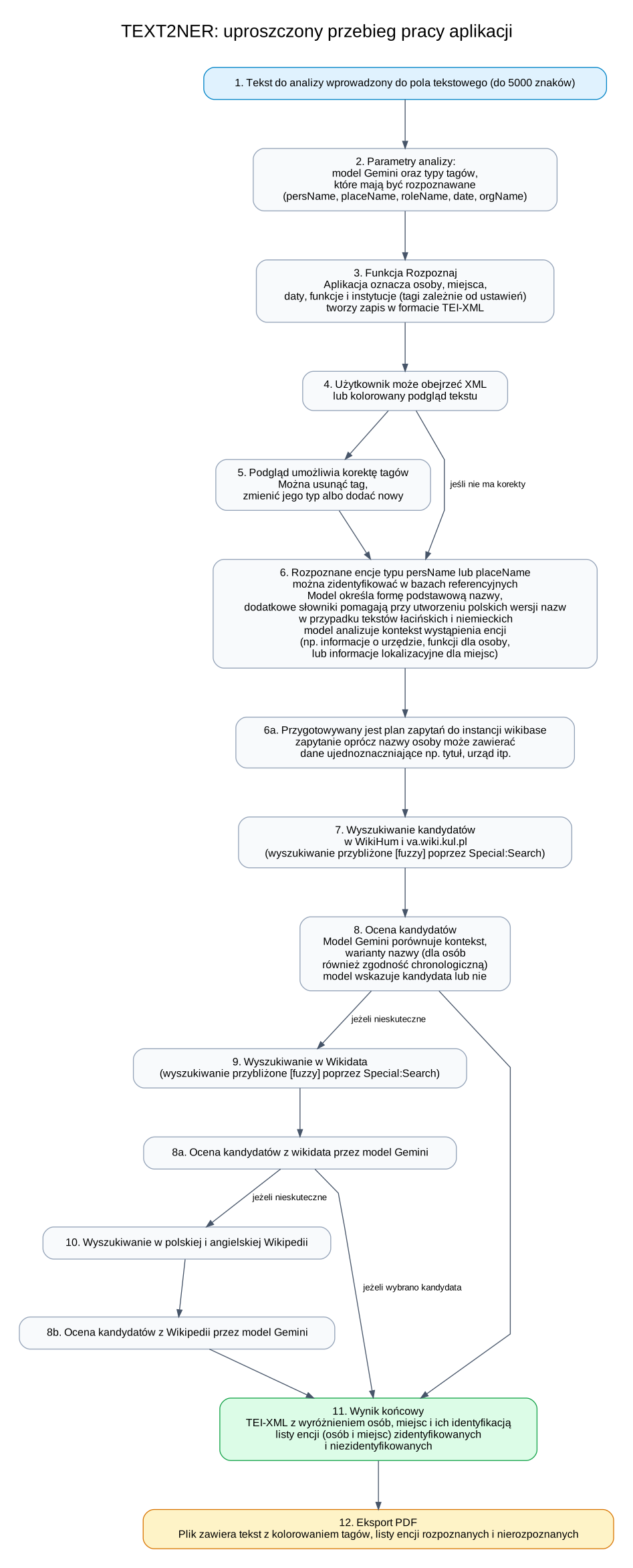
Below is a simplified diagram of the process of converting document text into TEI-XML format, including entity tagging and identification in reference databases. A detailed diagram is available at the bottom of the page.
Notes and limitations
- The input text is currently limited to 5000 characters.
- Reference identification is performed only for
persNameandplaceName. - Recognition and identification results are intended as research support and should be treated as a working stage of scholarly editorial processing.
- Analysis may take from several seconds to several minutes, depending on text length, number of entities, selected model, and response times of external resources.
- Wikidata limits the intensity of automated traffic. The application slows requests down
and retries them after an
HTTP 429response, but during periods of heavier load this may make the identification stage take longer. - In very difficult, ambiguous, or rare historical cases, some entities may still require manual correction.
Further work
- Optimizing searches in Wikibase instances - caching results.
- Using available vector databases (e.g., Wikidata Vector Database) for additional searches using the context of the name occurrence.
Examples
After successful recognition and identification, an entity may be written for example as:
<persName key="Fryderyk Jagiellończyk"
ref="https://wikihum.lab.dariah.pl/entity/Q152903">Fridericus</persName>
If the identifier has been assigned manually by the user from the candidate list, the
application records this decision in the cert and resp
attributes:
<persName key="Iohannes von Kittlitz"
ref="https://va.wiki.kul.pl/entity/Q2138"
cert="medium"
resp="#manual">Iohannis</persName>
For dates, the application may write the when attribute, for example:
<date when="1446-07-04">4 iulii 1446</date>Sample application outputs (TEI-XML and PDF files)
-
Acta Alexandri Regis Poloniae, Magni Ducis Lithuaniae etc. (1501-1506), ed. Fryderyk Papee, Krakow 1927. Document no. 3, p. 2 (Early New High German).
-
Acta Alexandri Regis Poloniae, Magni Ducis Lithuaniae etc. (1501-1506), ed. Fryderyk Papee, Krakow 1927. Document no. 10, p. 9 (Latin).
-
Wikipedia, excerpt from the entry: Jan Kostka (Polish)
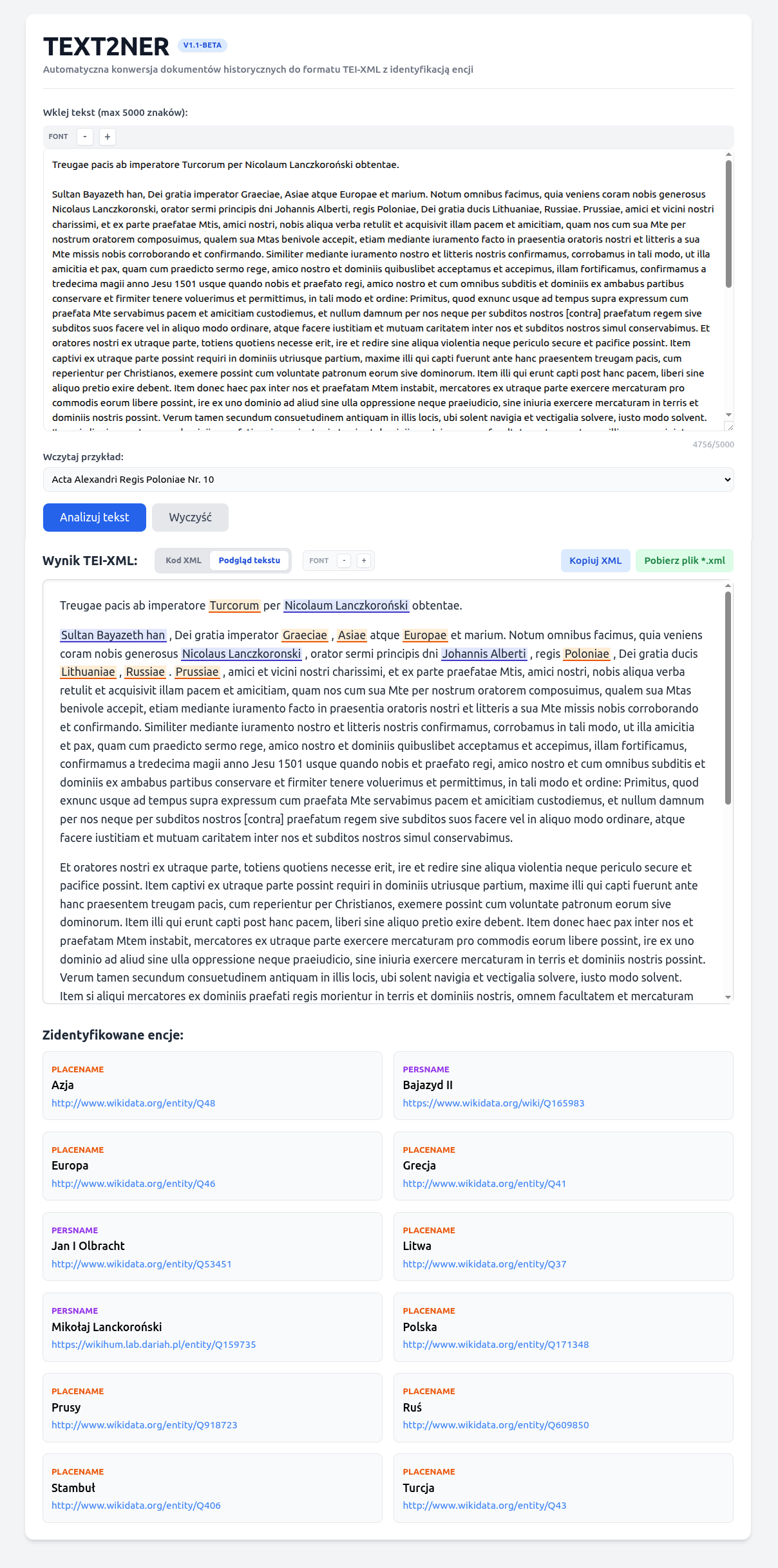
Application screen showing the result of processing document no. 10 from the
Acta Alexandri Regis Poloniae, Magni Ducis Lithuaniae, etc. (1501-1506)
(Sultan Bajazet II concludes a truce with Jan Olbracht at the hands of the royal envoy Mik. Lanckoronski.):
a detailed diagram of the entity recognition and identification process is available in the GitHub repository with the application source code.